Homelab Upgrade Pt.4 - Automagic Kubernetes?
2026-03-26
Is deploying kubeadm Kubernetes on a rolling release distro with no versioning probably a bad idea in the long run? Yes. Watch me do it anyway :D
A fairly good starting point
A few years ago when I first started messing around with Kubernetes at home, I got some Ansible playbooks made up to create a basic cluster and install storage and network interfaces. Those playbooks were a little janky though, so before I'm happy to stick a stamp of approval on them, there's a few things that I'll need to change first before I'm happy to run them on top of the VMs I made in my previous post:
- Multiple controllers.
- HA kube-api access.
- Installation of cluster interfaces.
Making the playbooks work for multiple controllers
My old ansible playbooks were built fairly quickly, and while they technically accepted controllers as a group of hosts to act upon... there really wasn't any thought into how that would work and the same steps were just run on all controllers. This was fine when I was making VMs manually just for testing (and so really didn't feel spinning up more controllers anyway), but now that VM creation is automatic and I'm going to be moving a lot of resources into Kubernetes, it's actually fairly important.
    - name: Bootstrap | Export join commands as facts (available to other plays)
      set_fact:
        worker_join_command: "{{ worker_join_cmd.stdout }}"
        controller_join_command: >-
          {{ worker_join_cmd.stdout }}
          --control-plane
          --certificate-key {{ cert_key_cmd.stdout | trim }}

- name: Controllers | Join secondary controllers to control plane
  hosts: controllers
  become: true
  serial: 1  # Join one at a time to avoid etcd race conditions
  tasks:

    - name: Secondary controllers | Join control plane
      command: >
        {{ hostvars[groups['controllers'][0]].controller_join_command }}
      args:
        creates: /etc/kubernetes/kubelet.conf
      when: inventory_hostname != groups['controllers'][0]
Luckily, getting multiple controllers in a kubeadm cluster working really isn't that hard. You simply initialize your main controller first with kubeadm init, and then run your normal kubeadm join command with the --control-plane flag added for the additional controllers.

A quick run of the playbook and test with k9s showed all the nodes as happy and with the correct roles.
Using kube-vip to make kube-api access HA
There isn't much point in having multiple controllers if you have no way to ensure that kube-api traffic actually gets sent to a controller that isn't down. Luckily, kube-vip is a project that provides a quick and simple way to create a floating IP to share between multiple machines (either using ARP or BGP), and it works nicely as a static pod so kubelet will handle running it.
    - name: kube-vip | Generate static pod manifest
      shell: >
        ctr --namespace k8s.io run --rm --net-host
        ghcr.io/kube-vip/kube-vip:latest
        kube-vip-gen-{{ ansible_date_time.epoch }}
        /kube-vip manifest pod
        --interface {{ k8s_vip_interface }}
        --address {{ k8s_vip }}
        --controlplane
        --arp
        --leaderElection
        > /etc/kubernetes/manifests/kube-vip.yaml
      args:
        creates: /etc/kubernetes/manifests/kube-vip.yaml
The standard kube-vip container very helpfully provides an inbuilt tool to generate a static pod manifest based on arguments provided to it, and so a very simple step to get kube-vip working on the controllers. Everything should just work now right? Magic HA done.
For whatever reason I wasn't able to get any response back from the the API server behind the VIP at all, and after a little bit of debugging with low-level CRI commands, it seems that I was running into the issue described on GitHub here. This seems to be an issue caused by a kubeadm behaviour change in 1.29+, which (provisionally) can be fixed by using super-admin.conf instead of admin.conf on the primary controller before kubeadm init.
    - name: kube-vip | Patch manifest to use super-admin.conf (required k8s >= 1.29)
      replace:
        path: /etc/kubernetes/manifests/kube-vip.yaml
        regexp: '(path: /etc/kubernetes/)admin\.conf'
        replace: '\1super-admin.conf'
      when: inventory_hostname == groups['controllers'][0]
Some simple Ansible allows this to be done, and after that everything seems to work. In the future this should probably be changed to a proper permissions role rather than handing kube-vip admin config files, but there is ongoing discussion about how best to achieve that.
Moving the cluster interface installation from Ansible to Terraform
My old playbooks integrate installation of the CNI and CSI as core components within the Ansible playbook. That was because naive younger me hadn't discovered the beauty of terraform and a properly tracked state. Since the CNI and CSI (cilium and longhorn in my case) both can be installed perfectly fine as cluster resources with helm charts, they would actually be served a lot better by being managed by terraform anyway.
resource "helm_release" "cilium" {
  name             = "cilium"
  namespace        = "kube-system"
  repository       = "https://helm.cilium.io/"
  chart            = "cilium"
  create_namespace = true
  wait             = false

  values = [
    yamlencode({
      ipam = {
        mode = "kubernetes"
      }
      kubeProxyReplacement = true
      externalIPs = {
        enabled = true
      }
      ingressController = {
        enabled = true
      }
      k8sServiceHost       = var.k8s_vip
      k8sServicePort       = 6443
      bpf = {
        masquerade = true
      }
      bgpControlPlane = {
        enabled = true
      }
    })
  ]
}

resource "helm_release" "longhorn" {
  name             = "longhorn"
  namespace        = "longhorn-system"
  repository       = "https://charts.longhorn.io"
  chart            = "longhorn"
  create_namespace = true
  wait             = false
}
Simply getting rid of the steps in the Ansible to install those, and creating them as Terraform resources instead worked first try. That can't bode well for the next step...
Some basic testing
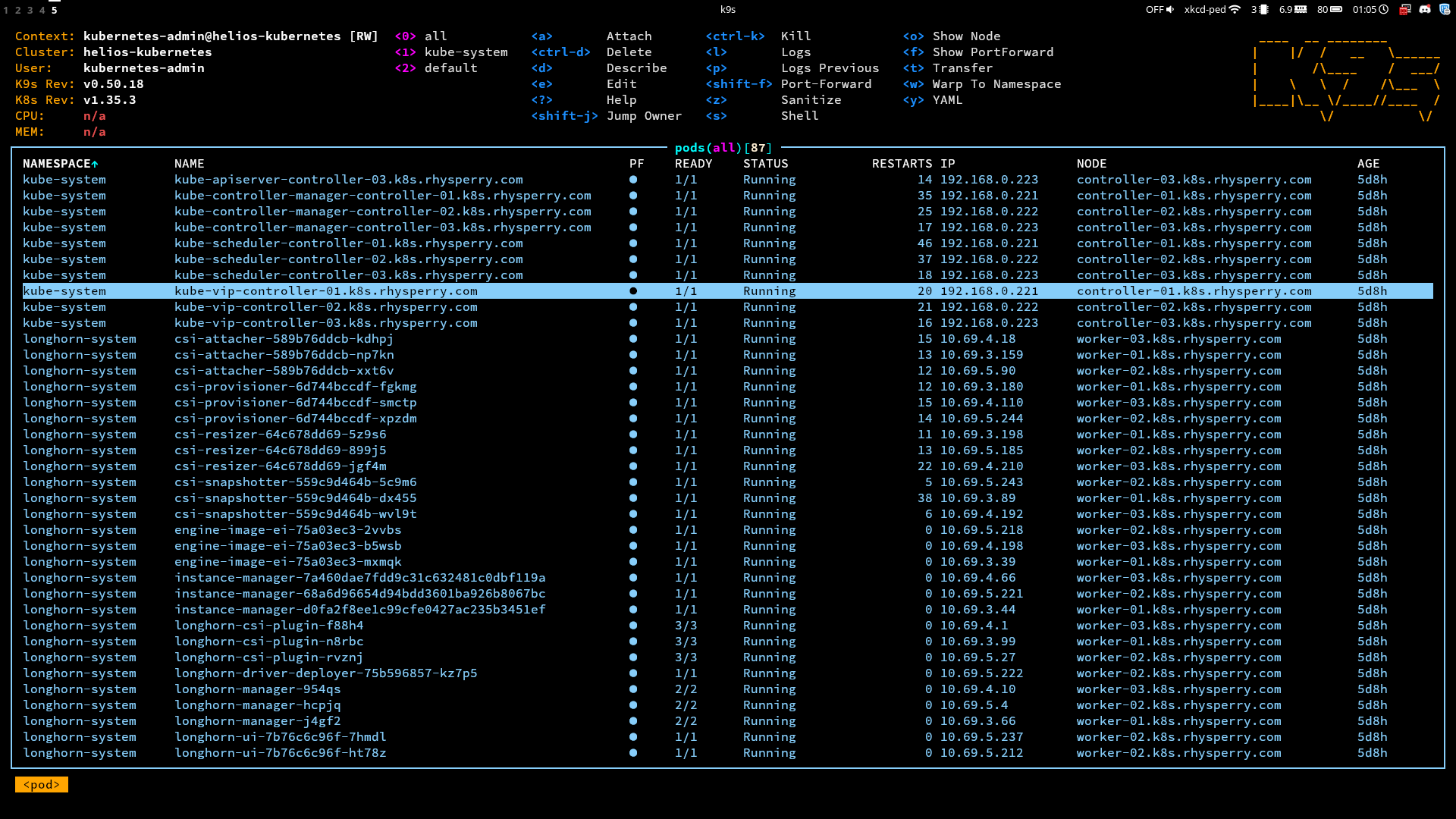
Cluster made... everything will just work now right? Well there isn't any red in k9s for the CNI and CSI pods, so at least that's a good start. Maybe I'll try spinning up some pods and doing some basic tests first though before calling it a day.
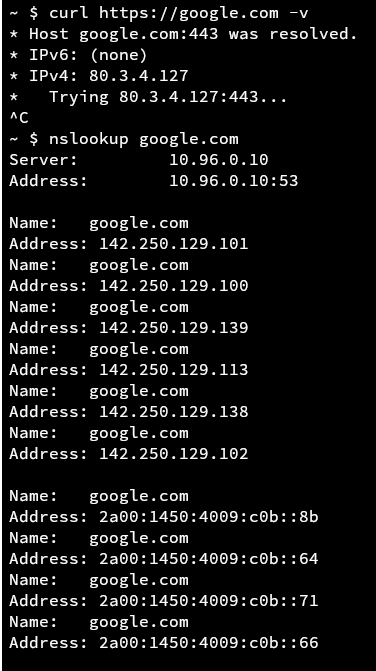
Pinging the internet works - good. I can reach some internal services by their API - also good. Connectivity between pods works - very good. But wait what... I can't reach google.com??? Surely this is a DNS issue then, but seemingly not because nslookup gives me the correct IP. Hmmm. Maybe MTU issues?!?!
Wait a damn second. Look at that curl debug output. It's reaching out to an IP that wasn't any of the DNS responses. Also wait an even more damned second... that's my public IP. Huh?

After an annoying amount of digging, getent hosts showed the cause of the problem. For whatever reason, whenever I asked for the OS to resolve a name like google.com, it would try and append the DNS search domain first, making it google.com.rhysperry.com in my case... and since I have wildcard DNS setup for my domain, that returned back my public IP.
But why was this behaviour happening? Well the pod gets its resolv.conf from the host node, but I don't remember setting that search domain in my cloud-init settings. Well, as it turns out, that's the exact problem - if you don't set a search domain in cloud-init, Proxmox will automatically use it's own search domain as the default. This is a little funny - the whole reason I can't reach google inside of a container is because of a setting 3 levels lower down in the stack.
searchdomain = "."
Simply adding an extra parameter to my VM creation terraform to unset the search domain fixed the problem, and I could finally sleep well knowing that I was a true kubestronaut. The obvious next steps are to get some cool stuff running in kubernetes... but that feels like something I should leave for my next post :)
All of the source code for this can be found in step 2 and step 3 of my helios-kubernetes IaC repo.