Homelab Upgrade Pt.3 - Proxmox x Terraform = ...
2025-11-18
I love terraform... like reeeeeally love terraform... how nicely does it play with Proxmox though?
A nice problem to have
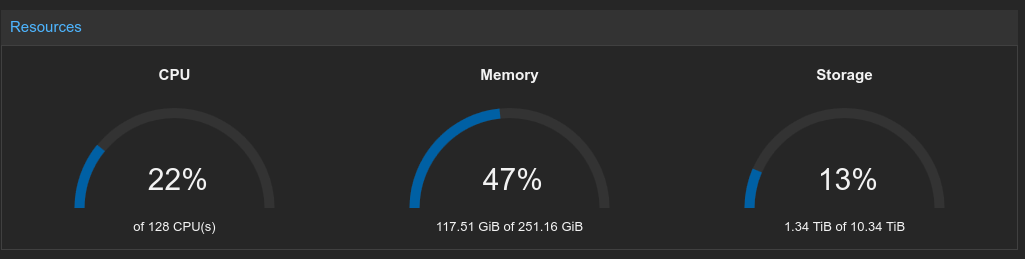
As mentioned in my Homelab Upgrade Pt.2 blog post, I now have a slightly-beefier-than needed Proxmox cluster in my homelab. So far, it's only really been running old VMs that I migrated from my old server, but I'd like to start doing things properly the same way I would do at work - having everything automated with Infrastructure as Code, with the source in Git for a nice audit log (although change-approval might be out of scope given I'm a one-man-band), and CI/CD to deploy changes and ensure that there is no unmanaged drift.
The first step in getting this sorted out is working out how to reliably terraform VMs in Proxmox, and so this blog post will detail that journey.
Getting started
A little surprising given how popular Proxmox is, it doesn't have an official terraform provider (although there is an issue open...). It seems that the community has converged on one maintained by Telmate, so I guess I'll be using that one.
As a sidenote, even though I'm mentioning "terraform" throughout this post, I'm only doing that to refer to the technology. Software wise everything is actually OpenTofu which is a fork of Terraform that came about after HashiCorp did some license fuckery. You can read more about it here, here and here, but if you care about FOSS it's worth considering switching.
Anyway this should be simple, reading the docs the provider just seems to need an API token.
terraform {
  required_providers {
    proxmox = {
      source  = "telmate/proxmox"
      version = "3.0.1"
    }
  }
}

provider "proxmox" {
  pm_api_url          = var.proxmox_api_url
  pm_api_token_id     = var.proxmox_token_id
  pm_api_token_secret = var.proxmox_token_secret
}
I mean... that seems to work. I made a basic proxmox_vm_qemu resource to clone my Arch cloud-init VM, tofu applyed, and yeah a VM appeared in Proxmox. Great :D
This should be a cakewalk.
The 3.x.x problem
The Telmate provider and the beautiful people that maintain it have been putting a lot of effort into putting together a major rewrite for major version 3 (and thank you for that... genuinely <3). Turns out though... some of the initial stable releases in the 3.x.x line are a little bit wonky, and so ramping up the complexity and count of resources deployed sometimes spits out some interesting errors - some disk configurations error on apply, sometimes it just seems like the provider is making an API request that Proxmox doesn't support...
After a fair bit of digging around on GitHub issues (where it seems like I wasn't the only person running into issues), I found that most issues really could just be solved by moving to an RC release.
version = "3.0.2-rc07"
Yeah... it's not great to have your IaC pinning release candidates explicitly, but hey - a dirty solution is better than no solution any day of the week. And you can't really expect me to go around making VMs from the Proxmox UI can you? I'd rather debug funny IaC providers than perform ClickOps like an animal.
HA ghosts
I'd already made a simple test VM... and I'd now got the version issues out of the way. Probably a good next test is to try and spin up a VM with all the bells and whistles I'll be using eventually.
resource "proxmox_vm_qemu" "test" {
  name        = "test-vm"
  target_node = "prox"
  clone       = "arch-cloud-template"
  full_clone  = true
  os_type     = "cloud-init"
  vm_state    = "running"
  bios        = "ovmf"
  scsihw      = "virtio-scsi-single"
  boot        = "order=virtio0"
  agent       = 1

  cpu {
    type  = "host"
    cores = 4
  }

  memory = 8192

  disks {
    virtio {
      virtio0 {
        disk {
          size    = "30G"
          storage = "vault"
        }
      }
    }
    ide {
      ide0 {
        cloudinit {
          storage = "vault"
        }
      }
    }
  }

  network {
    id       = 0
    model    = "virtio"
    bridge   = "vmbr0"
    firewall = true
  }

  ipconfig0  = "ip=192.168.0.221/24,gw=192.168.0.1"
  nameserver = "1.1.1.1"
  sshkeys    = var.ssh_public_key
}
The VM made itself successfully... and after a bit of waiting around I could even SSH into it, so it seems cloud-init was working perfectly as well. Yippee!
Plan: 0 to add, 1 to change, 0 to destroy.
I then ran a tofu plan afterwards to see how happy the state consistency was and wait... what? I've changed nothing and for whatever reason the provider thinks there's a change that needs to be applied already.
After skimming the diff, it seems that for whatever reason the hastate variable was planned to change, despite me never having defined it initially. As it turns out, if you have HA enabled in Proxmox, Proxmox will automatically add a hastate to every VM you make upon creation, and due to some slight inconsistencies in the terraform provider, these aren't properly brought into the statefile. The provider will then see this discrepancy during its plan, and try to revert it. Every single damn time.
hastate = "started"
The fix was fairly simple though, just be explicit about the hastate you want the VM to have in the terraform definition, and then the provider would know to properly create and track it in Proxmox.
Scaling things up
Since the single-VM test went so swimmingly, it was a good time to try and increase the VM count and see what broke next.
resource "proxmox_vm_qemu" "controllers" {
  count       = var.controller_count
  name        = format("controller-%02d", count.index + 1)
  target_node = element(var.proxmox_nodes, count.index % length(var.proxmox_nodes))
  # ...
}
I used a simple count in terraform to create multiple instances of the resource, and a slight hack to spread the VMs out across my target_nodes as Proxmox doesn't fully support machines just being owned by the cluster and moved around with something like DRS yet.
I also added pm_parallel = 4 to the provider definition, because ain't nobody got time to wait for each VM to come up sequentially.
Error: 500 unable to create VM 108: config file already exists
Well that's not good. Upon apply it seems that all 3 counts of my VM tried to create with the same ID? Well it turns out there's a race condition in the provider caused querying the next available VM ID from the Proxmox API for each of them all at once... then it tries to create all of them with that ID all at once. In reality this is caused by bad API design - for a static ID like that it'd be a lot better to not need to include it in the request, and then just return what was used in the response, however that's what you get without a first-party provider :)
resource "proxmox_vm_qemu" "controllers" {
  count = var.controller_count
  vmid  = 800 + count.index
  # ...
}

resource "proxmox_vm_qemu" "workers" {
  count = var.worker_count
  vmid  = 850 + count.index
  # ...
}
The unsatisfying fix to this was really just to hardcode the VM ids in terraform. A simple base+offset method is perfectly fine. I can hear you screaming from the sidelines already "but what if you have more than 50 controllers?"... and well... I guess I'll cross that bridge when I get to it.
There is one more issue that I'd like to talk about, but I haven't got to the bottom of yet so I'll leave it out for now. For some reason, sometimes destroying a VM from terraform will leave its disks in the datastore, and then recreating a VM with the same ID causes havoc. If anybody has any hints... please help... and if I find the cause I'll add it into this post.
Making it proper
Now that I was fairly confident I'd worked out all the issues with the provider, I could actually do what makes terraform so magic - splitting out the actually useful information into well-documented tfvars, and using terraform as a programming language to turn that described state into the needed resources.
locals {
  vm_defaults = {
    clone              = var.template_name
    full_clone         = true
    os_type            = "cloud-init"
    start_at_node_boot = true
    vm_state           = "running"
    hotplug            = "network,disk,usb"
    bios               = "ovmf"
    scsihw             = "virtio-scsi-single"
    boot               = "order=virtio0"
    agent              = 1
    hastate            = "started"
  }
}
First it was worth breaking out a lot of the boilerplate VM options (that didn't need to be user-tuned) into locals to avoid duplication.
Then I wrote up a nice tfvars definition with sensible defaults, and changed main.tf to use those.
# Generated by Terraform. Do not edit manually.

all:
  vars:
    ansible_ssh_common_args: '-o StrictHostKeyChecking=no'
    ansible_python_interpreter: /usr/bin/python3
    ansible_user: arch
  children:
    controllers:
      hosts:
%{ for i, c in controllers ~}
        ${c.name}:
          ansible_host: ${network_prefix}.${controller_ip_start + i}
%{ endfor ~}
    workers:
      hosts:
%{ for i, w in workers ~}
        ${w.name}:
          ansible_host: ${network_prefix}.${worker_ip_start + i}
%{ endfor ~}
As an extra nice step, I created a template that would take the IPs of VMs generated by terraform, and generate an ansible inventory that could be used later.
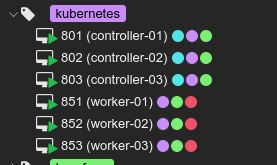
After all of that mess... everything just kinda works as expected. I now have a nice way to automate building VMs to build off of :)
All of the source code for this can be found in step 1 of my helios-kubernetes IaC repo.